For wrap shops · Updated for 2026
The Best Software forVehicle Wrap Shops
Quote, proof, print, and install with department boards, clear handoffs, and a schedule that keeps install appointments separate from promised due dates.
7-day trial · No card required · No automatic charge. A demo is optional.
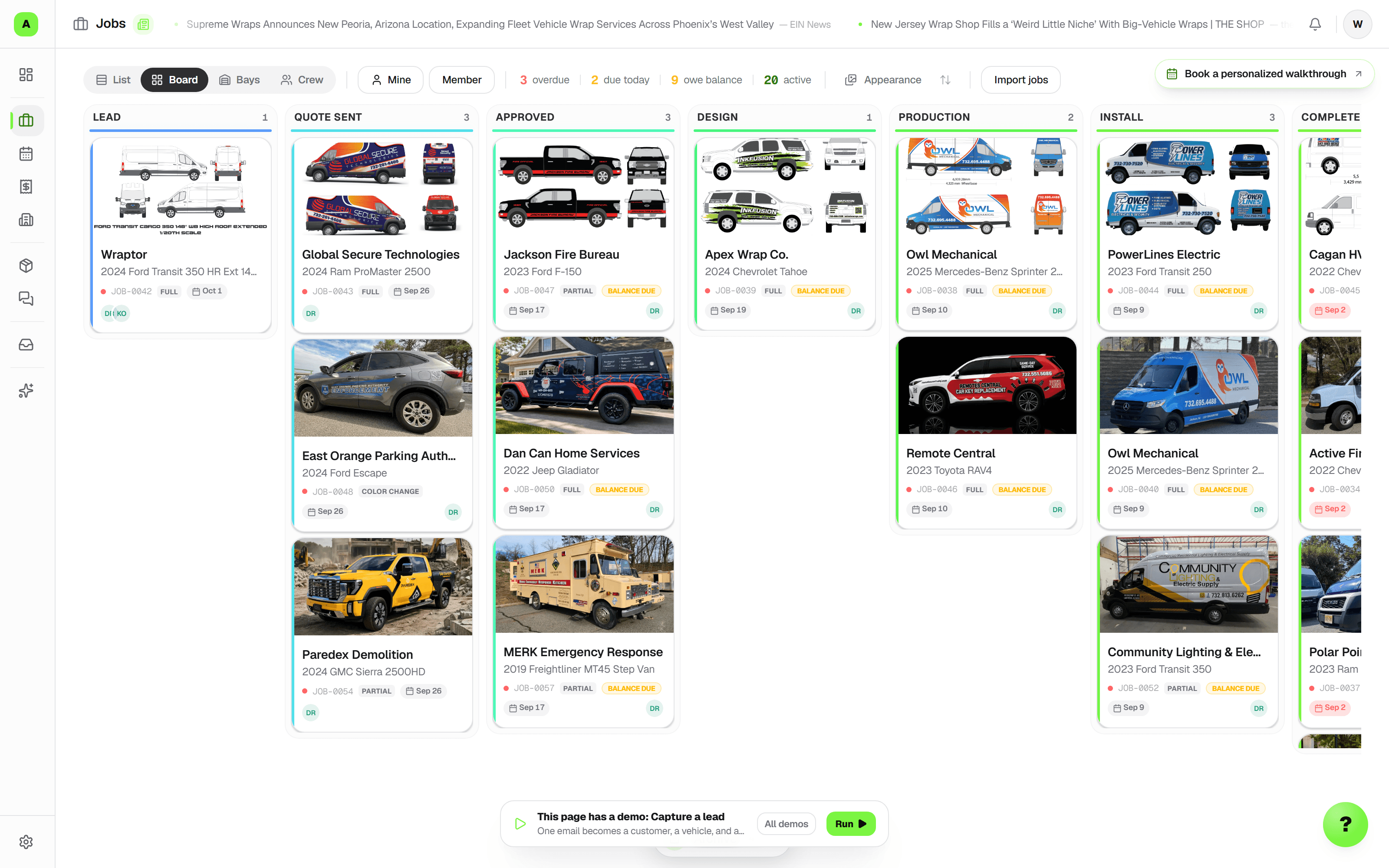
Keep the quote, the work, and the customer connected.
Quick answer
Wraptor connects vehicle quoting, print products, proofs, scheduling, inventory, customer tracking, and payments in one workspace. New eligible shops start with a 7-day free trial with Wraptor Shop features and trial usage allowances — no card required, no automatic charge. A guided demo is optional. Your work stays saved when the trial ends; choose a paid plan to continue. Starter is $99/month for 2 seats and one location. Shop is $199/month with unlimited seats and larger email, storage, and AI allowances. Fleet is $299/month and adds unlimited department boards and white-label Magic Wrap. Inbound lead routing has no per-lead fee; lead volume depends on service area and demand.
How do I try Wraptor before subscribing?
New eligible shops can start a 7-day Wraptor Shop trial directly, without a card or an upfront plan choice. There is no automatic charge. The trial includes 15 AI credits, 3 logo vectorizations, and 3 file conversions; connect your existing email to try customer communication. Hosted WrapMail inboxes and API access require paid membership. Your work stays saved when the trial ends. A guided demo is optional.
Can we review requests and quotes before saving work?
Yes. Review the captured service and customer, then continue into a draft quote. Compare requested work with the draft and choose any additions. You enter prices, choose tax categories, and decide when to share. Proof feedback and job notes can also become reviewed checklist tasks or handoff clarifications.
Can we read scans and split documents between jobs?
Review text from supported PDFs, text documents, and English printed PNG/JPEG scans. Choose the job and category for the original, or assign pages separately and correct them later. Originals stay preserved. Automatic job matching and automatic filing are not offered.
Can we override an internal scheduling conflict?
Staff with scheduling access can choose Allow overlapping bookings for one save. Bay and crew conflicts are explained separately. A recorded finish releases unused bay time after cleanup; public self-booking keeps its conflict rules.
Can each department have its own board?
Yes. Start with Wraps, Signs, or PPF, then name the stages for your process. One customer job can contain work on several department boards, with optional dependencies and one customer and billing record. The combined jobs view shows where every department stands. Department boards are included on Fleet, with unlimited boards.
Can we schedule an install before production is finished?
Yes. Set an install date, time, and duration when creating or editing the job, independently of its workflow stage and promised due date. Switch Schedule between install dates and due dates, then use agenda, week, or month. Bays and crew assignments are optional: a shop with one install location can schedule there without creating a bay. Each employee can save Schedule, Today, List, or another available jobs view as their default.
How does the scheduler hand work over to the floor manager?
Assign scheduling and production owners, record the next action, flag a blocker, and set a follow-up on the job. The manager can acknowledge the version they reviewed; later changes remain visible in the handoff history. Today brings together today's and tomorrow's work, changes needing review, blockers, customers awaiting a reply, and follow-ups due. Quick capture turns a short note and reference photos into a job request for review, without requiring a vehicle or matched customer.
How do customers hear about appointment changes?
Staff can prepare an editable appointment message from a template, review it, and send it through the existing message composer. Track appointments as Tentative, Communicated, or Confirmed; rescheduling returns them to Tentative so the team knows to reconfirm. On a phone, photo uploads offer camera, library, or file selection, keeping reference and inspection photos with the work.
What is the best CRM for vehicle wrap shops?
Compare how each product handles one of your real jobs. Wraptor connects a vehicle CRM, custom job stages, quoting and Stripe invoicing, customer tracking, email and design tools, proofing, inventory, and scheduling. Starter is $99/month for 2 seats and one location. Shop is $199/month with unlimited seats and larger email, storage, and AI allowances. Fleet is $299/month and adds unlimited department boards and white-label Magic Wrap. New eligible shops start with a 7-day free trial with Wraptor Shop features and trial usage allowances — no card required, no automatic charge. A guided demo is optional. Your work stays saved when the trial ends; choose a paid plan to continue.
What software do vehicle wrap shops use?
Vehicle wrap shops typically use a combination of tools: a project management tool (Trello, Monday.com), invoicing software (QuickBooks, FreshBooks), a CRM (spreadsheets or HubSpot), email (Gmail), and design tools (Adobe Illustrator). This patchwork approach creates inefficiency, data silos, and dropped balls. Purpose-built wrap shop software like Wraptor replaces all of these with a single platform designed for wrap-specific workflows. Other industry options include shopVOX (sign shop focused, from $109/month + $29/user), SignTracker (project tracking, $65–$189/month), Tint Wiz (tint-focused, $150/month), and GarageTool (newer, $100–$200/month + $10/employee).
How much does wrap shop management software cost?
Starter is $99/month for 2 seats and one location. Shop is $199/month with unlimited seats and larger email, storage, and AI allowances. Fleet is $299/month and adds unlimited department boards and white-label Magic Wrap. Annual billing is $990/year for Starter and $1,990/year for Shop. Extra locations, inboxes, and metered usage are priced separately. New eligible shops start with a 7-day free trial with Wraptor Shop features and trial usage allowances — no card required, no automatic charge. A guided demo is optional. Your work stays saved when the trial ends; choose a paid plan to continue.
What features should wrap shop software include?
Essential features for wrap shop software include: (1) Visual job board with custom workflow stages matching the wrap process (Lead, Design, Print, Install, QC, Complete), (2) Quoting and invoicing with online payment processing, (3) CRM with vehicle database tracking year/make/model/VIN, (4) Customer portal where clients can check job status without calling, (5) Client proofing with visual commenting and approval tracking, (6) Vinyl and material inventory management with low-stock alerts, (7) Team scheduling and install bay management, (8) Email and SMS notifications for status updates, (9) Accounting integration with QuickBooks or Xero. Advanced features include AI-powered email with lead detection, AI creative studio for wrap mockups, image vectorization for logo conversion, tiered (good-better-best) quoting, opt-in automated quote follow-ups, and instant square-footage estimating — Wraptor resolves the year/make/model against 2,232 measured vehicles and returns exact per-panel square footage (sides, back, hood, roof, with bleed) for full, three-quarter, spot, or custom coverage, labeled clearly when it falls back to a nearest match or manual dimensions.
Is Wraptor better than shopVOX for wrap shops?
Both offer quoting, custom workflows, and proofing. shopVOX also offers vehicle-template estimating through its paid smartWrap PRO add-on. Wraptor combines vehicle records, print catalog pricing, production tickets, and install scheduling with handoff owners and a customer tracker. Fleet adds department boards. Starter is $99/month for 2 seats; Shop is $199/month with unlimited seats. Compare a real order and your team's total subscription cost on our shopVOX comparison page.
How do wrap shops quote a whole fleet?
Price it per vehicle, or put the vehicle count on a per-item line for one price across the roster — then duplicate the approved quote for the next unit instead of retyping it. Running the account is one parent job with a child job per vehicle, each with its own install date, proof, and tracking page, and the customer follows every truck from one fleet link.
Can wrap shops take a deposit before the install?
Yes. Any invoice can split into a deposit and a balance: the customer pays each on one page, the schedule prints on the PDF, and a cash deposit taken at the counter clears itself automatically. You can add, edit, or remove the deposit on a draft or a sent invoice as long as nothing has been paid yet. It's a two-part deposit-and-balance split, not milestone billing — enough to hold the bay and cover material before anything goes on the printer.
Can I track vehicle wrap jobs with a kanban board?
Yes. Wraptor's job board is a drag-and-drop kanban system with custom workflow stages designed for the vehicle wrap process. Default stages include Lead, Quoted, Deposit Received, Design, Proof Sent, Approved, Scheduled, Printing, Production, Install, QC, Complete, and Picked Up. Each stage can be customized with colors and labels. Jobs can be filtered by status, assigned installer, vehicle type, wrap type, and due date. Status changes automatically trigger customer notifications via email or SMS.
How do wrap shops handle client proofing and approvals?
Most wrap shops handle proofing through email chains — sending PDF proofs back and forth, which leads to miscommunication, lost feedback, and installing the wrong version. Professional wrap shops use dedicated proofing tools. Wraptor's client proofing system lets you upload a design, share a link with the customer, and let them pin comments directly on the image. Customers can approve or request changes with one tap from their phone. Every version is tracked, so you never install the wrong revision. The proofing workflow integrates directly with the job board — when a proof is approved, the job automatically advances to the next stage.
What is a customer job tracker for wrap shops?
A customer job tracker is a customer-facing link that shows the status of a vehicle wrap project. Customers can check the stage, see photos and shop updates, review proofs, and pay invoices. Wraptor keeps those actions with the same job so customers have a place to check progress and the shop can spend less time repeating status updates.
How do wrap shops track vinyl inventory and materials?
Track vinyl rolls, laminates, and supplies by brand, series, width, remaining length, finish, shop location, and cost. Wraptor keeps material usage with the job and provides low-stock alerts, helping staff check availability before promising an install and compare estimated material costs with actual usage.
What is WrapMail and how does AI email work for wrap shops?
Wraptor connects email to customers, jobs, and leads, with lead detection, reply drafts, tagging, and follow-up reminders. You can connect your existing mailbox during the trial. Hosted WrapMail inboxes require paid membership: Starter includes 1 shared mailbox and Shop includes up to 3, with custom-domain and @wrapmail.net addressing.
How do I choose between wrap-specific software and general tools?
General boards are flexible, and accounting tools are useful for your books. Compare how much setup and manual handoff your team needs across those products. Wraptor connects vehicle records, quotes, proofs, material usage, scheduling, and customer tracking in a workflow built for shop work. Try a recent job and compare the full subscription cost, the steps your team repeats, and the accounting tools you want to keep.
Does Wraptor integrate with QuickBooks and accounting software?
Yes. Wraptor integrates with both QuickBooks and Xero for accounting sync. Invoices created in Wraptor can sync to your accounting software automatically. Payments collected through Stripe are recorded in both systems. This means you can use Wraptor for day-to-day shop operations (job management, quoting, invoicing, customer communication) while keeping your accountant happy with clean books in QuickBooks or Xero. No double data entry required.
Head to head
How Wraptor stacks up
Side-by-side comparison of Wraptor vs the tools shops in this vertical typically use.
| Feature | Wraptor | shopVOX | SignTracker | Trello | QuickBooks |
|---|---|---|---|---|---|
| Custom workflow stages | Confirm with vendor | - | |||
| Kanban job board | - | ||||
| Quoting & invoicing | - | ||||
| Fleet accounts (parent job, child job per vehicle) | Partial | - | - | - | |
| Vehicle measurements for estimating | smartWrap PRO add-on | - | - | - | |
| Online payments (Stripe) | Partial | Via QuickBooks | - | ||
| Deposit + balance payment schedule | Partial | - | - | Partial | |
| Customer job tracker portal | - | - | - | - | |
| Client proofing & approval | Approval workflows; confirm proof tools | - | - | ||
| Vehicle database & CRM | - | - | - | - | |
| Material inventory tracking | Optional PRO add-on | Confirm with vendor | - | - | |
| AI-powered email | - | - | - | - | |
| AI creative studio | - | - | - | - | |
| Team scheduling | - | - | |||
| Digital vehicle inspections | - | - | - | - | |
| VIN camera scan & decode | - | - | - | - | |
| Purchase orders & vendors | - | - | Plus and up | ||
| Payroll-ready pay periods | - | - | - | Paid add-on | |
| Public API & webhooks | Shop plan | Add-on | - | ||
| Accounting integration | Partial | QuickBooks sync | - | ||
| Starting price | $99/mo, 7-day free trial | $109/mo + additional full users | $65/mo | Free | $38/mo |
Ready to run your shop smarter?
7-day trial · No card required · No automatic charge. A demo is optional.