The Wraptor platform
Your whole shop.
In one place.
From the first inquiry to the final invoice, give your team a workspace that connects every part of the job.
7-day trial · No card required · No automatic charge
Less scattered. More connected.
Good work starts with a clearer workday.
Explore the full platform
Everything your work touches.
Follow the job from lead to payment, or find the tools for the part of your business you want to improve next. Explore the feature pages and practical guides below.
Access, seats, and usage allowances depend on your plan. Compare what is included.
01
Job Lifecycle
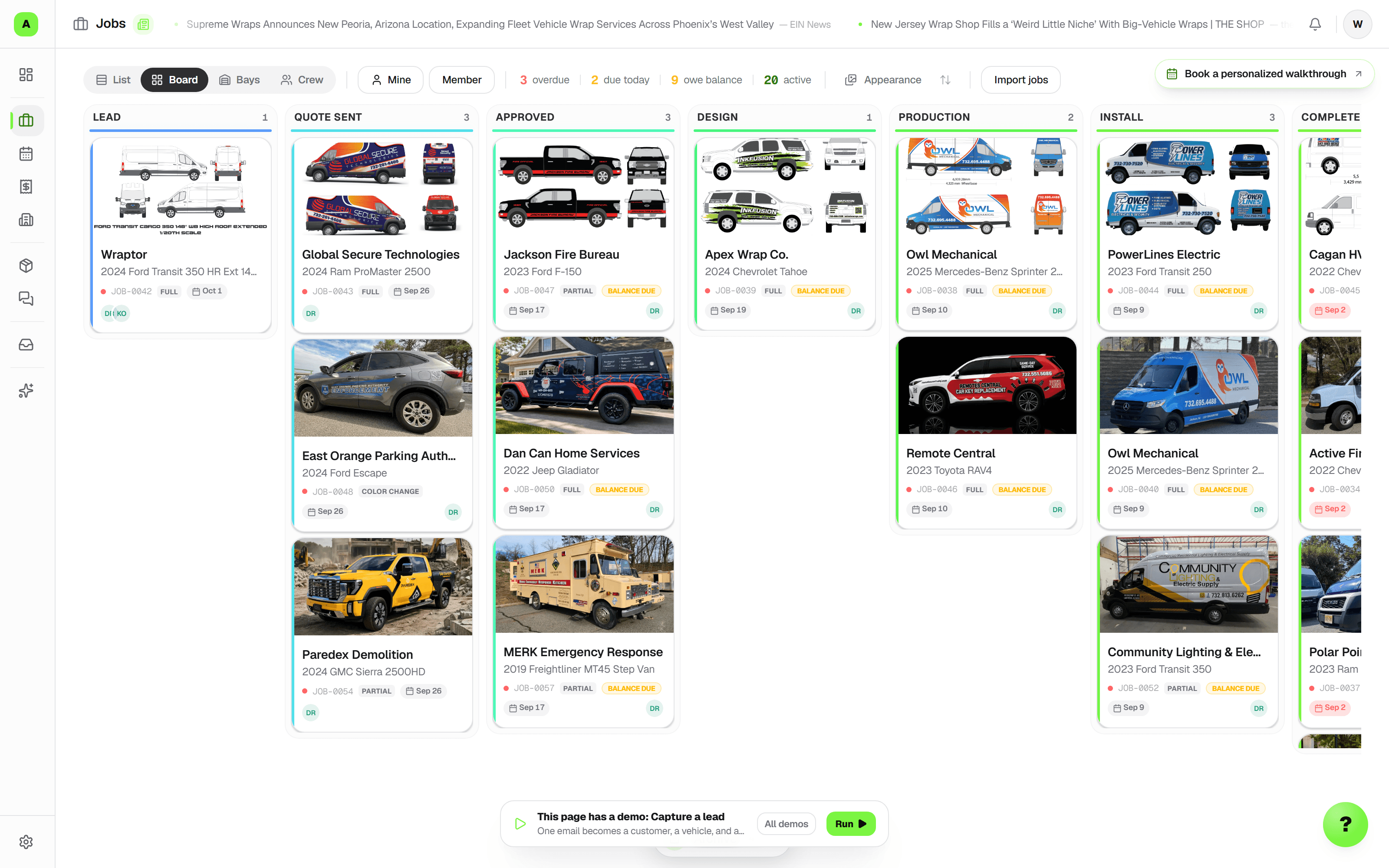
Jobs & Department Boards
Keep the schedule, artwork, owners, and next action with one customer job. Fleet adds separate department boards for wraps, signs, PPF, and your own workflow.
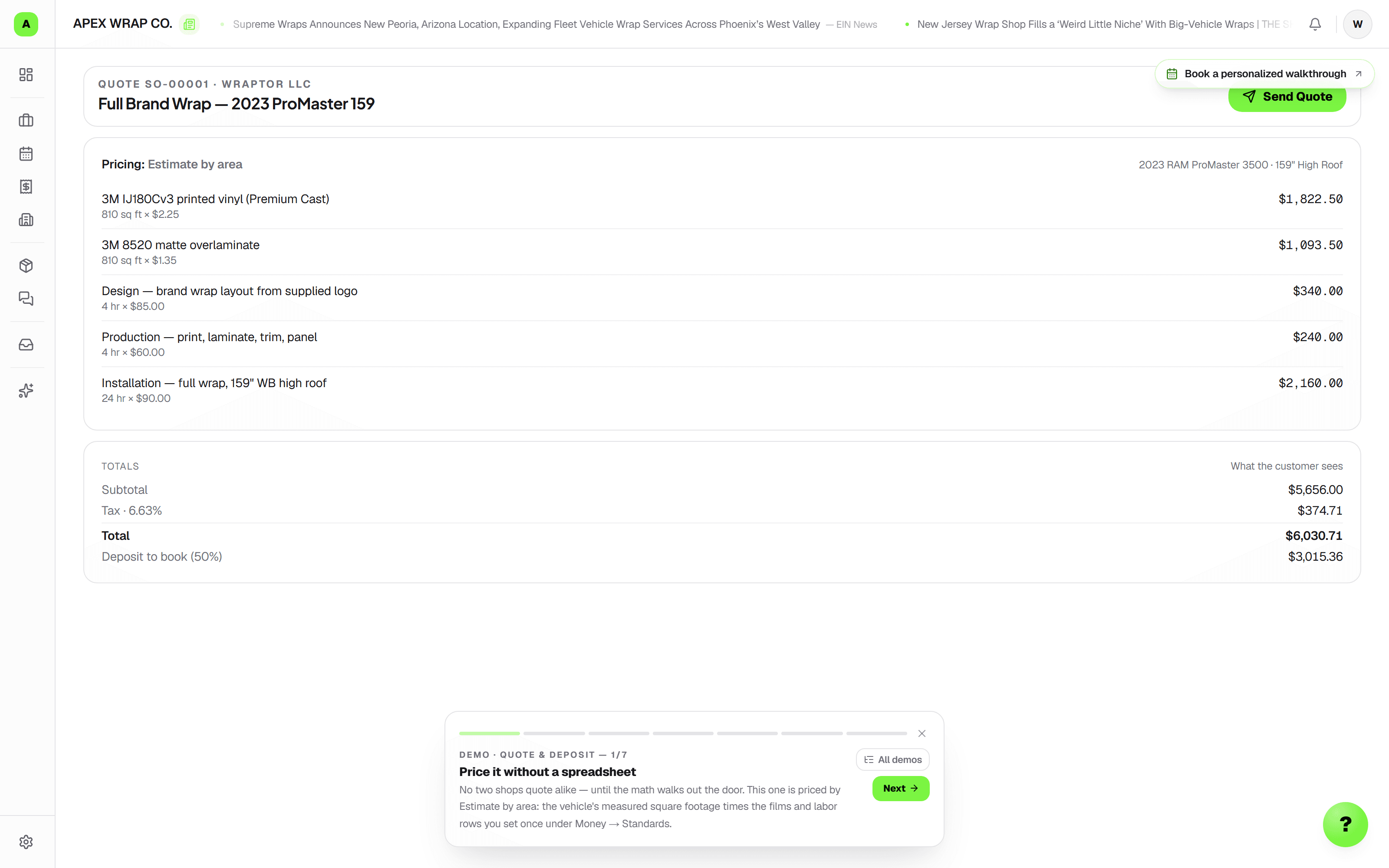
Quotes & Print Orders
Send options customers can approve from a link. Use your rates, saved print recipes, quantity breaks, and finishing; prepare repeat orders with current prices to review.
Customer Proofing
Get artwork approved before production. Share a no-login proof link, collect pinned feedback, and turn reviewed changes into job tasks.
Scheduling & Capacity
Plan installs and promised due dates with optional bays and crew. Shop and Fleet add a capacity planner to see where the week is filling up.
Invoices & Payments
Collect deposits and balances by card or US bank account through Stripe. Track offline payments, send branded invoices, and enable overdue email reminders.
Vehicle Inspections
Record the condition at drop-off and pickup with photos, short videos, and a graded checklist. Signed reports stay locked and available to the customer.
Documents & E-Signatures
Get work authorizations, waivers, and care instructions signed on the customer's phone. Keep the exact wording, signature, and audit trail in a locked PDF on the job.
QuickBooks & Xero
Connect your accounting platform to sync customers, approved quotes, invoices, and payments. Manage automatic sync, conflicts, and recent activity from Wraptor.
02
Customers & Vehicles
Customer CRM
Know the customer before the next call. Keep contacts, vehicles, brand details, and job history together, including print and sign orders without a vehicle.
Vehicles & Measurements
Spend less time starting estimates from scratch. Scan VINs, reuse vehicle history, and draw on 2,232 measured vehicles, with exact, nearest-match, or manual dimensions clearly labeled.
Fleet Accounts
Keep a multi-vehicle contract organized. Run one parent job with a child job per vehicle, independent schedules, and one progress link for the customer.
03
Comms
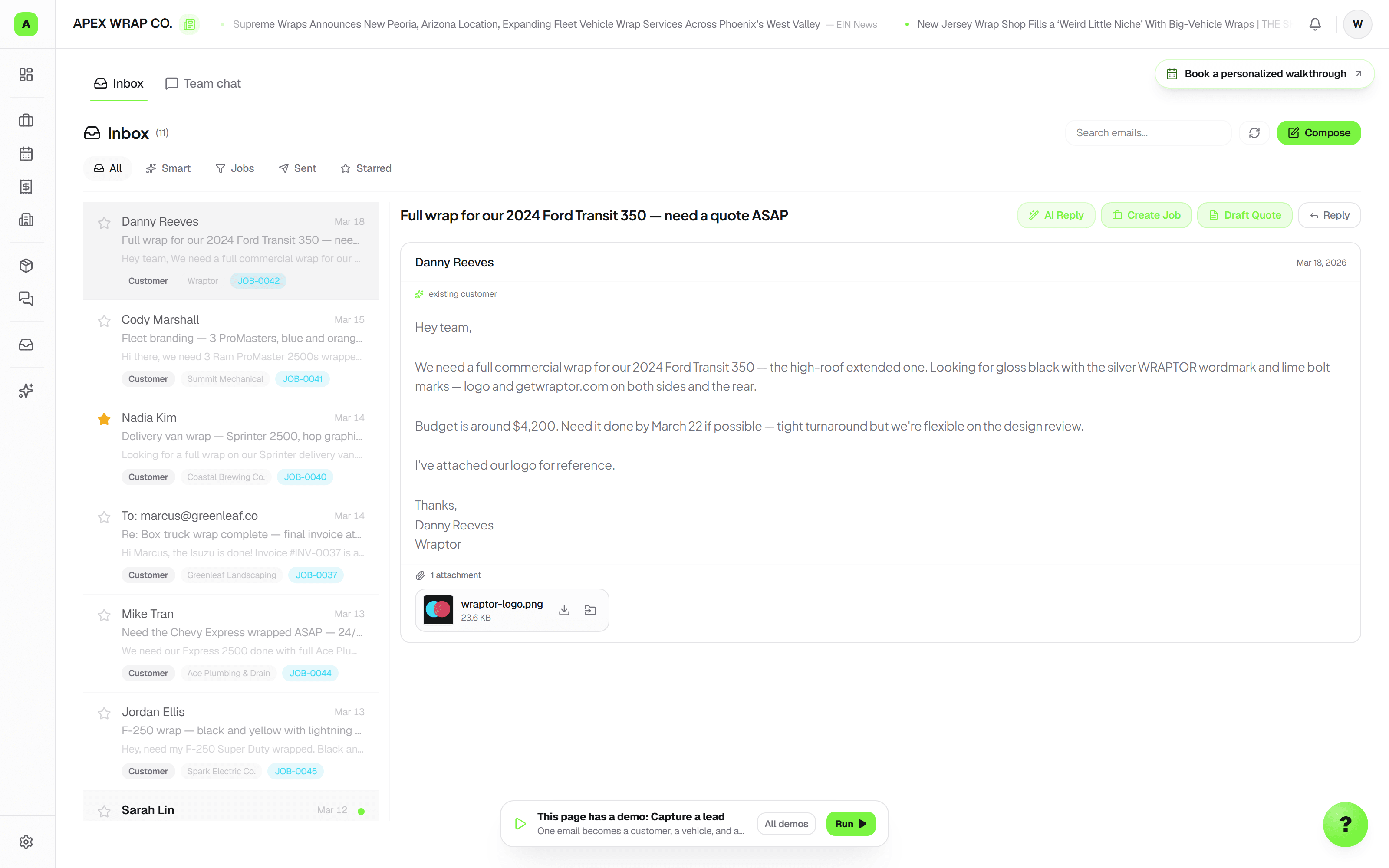
WrapMail Inbox
Reply with the job context close at hand. Classify incoming leads, share or restrict mailboxes, and control each teammate's read and send access.
Messages & Handoffs
Keep the office and floor in step. Use team chat, job-linked email, editable appointment drafts, and named owners for the next action.
Customer Follow-Ups
Enable quote nudges, win-back emails, review requests, and ready-for-pickup messages. Control customer emails and quiet hours, then see actual sending activity.
04
Production
Daily Ops
Give the crew a clear start to the day. Share opening, production, and closing checklists, and use Today to focus on upcoming work and follow-ups.
Colors & Brand Libraries
Keep the right color close at hand. Save your house palette and customer brand colors, browse Wraptones, and export swatches for design work.
Inventory & Material Costs
See stock, low-stock alerts, and estimated versus recorded material use. Shop and Fleet add individual rolls, remnants, and supplier cost-drift alerts.
Purchase Orders
Reorder low stock by vendor, send a numbered purchase order, and record deliveries. Receiving updates linked inventory and books the material expense together.
Equipment & Maintenance
Keep printers, plotters, laminators, and tools on one register. Set recurring maintenance, record completions, and review overdue tasks before the next run.
05
Creative
AI Mockups & Showcase Images
Help customers picture the result and showcase finished work. Create AI renders, before-and-after images, and social content from your shop's photos; usage allowances apply.
WrapStudio Design
Take artwork through to production in one workspace. Edit vectors, import templates, panelize designs, export print and cut files, and merge fleet lettering from a CSV.
Files & Mobile Photos
Find the artwork and install photos that belong to the job. Upload from your phone, read supported printed scans, and review document or page assignments before filing.
06
Growth & Intelligence
Marketing & Repeat Business
Turn finished work into ready-to-post content, manage incoming leads and reviews, and send branded newsletters on paid plans. Keep the next customer connected to the work.
Wraptor AI
Spend less time finding and retyping details. Review request and quote suggestions, organize proof tasks, and find work with descriptive search or supported voice and typed commands.
Reports & Profitability
See where cash and margin need attention. Review collected revenue, conversion, material costs, install hours, and ranked profit leaks with links to the work behind them.
07
Team & Platform
Team, Time & Pay Periods
Give each person the right access and a clear handoff. Track job hours and prepare locked pay periods with wage and commission exports for your payroll provider.
Shop Handbook
Help the next teammate follow your standards. Publish searchable SOPs, install guides, and training pages in a knowledge base built for your shop.
Plans & Locations
Choose the seats, storage, inboxes, and usage allowances your shop needs. Shop and Fleet offer unlimited seats and additional locations as a paid add-on.
Dashboard & Setup
Start the day with the shop's workload and numbers in view. Guided setup helps you bring in a real customer or job and configure the services you sell.
Data Migration
Bring customers, vehicles, and active jobs from your existing tools. Review column and stage mappings before importing; source IDs provide re-import protection for jobs.
Mobile App & Notifications
Take Wraptor onto the shop floor with an installable web app. On supported devices, enable alerts for leads, bookings, payments, and changes that need your attention.
API & Webhooks
Connect the shop to your own tools. Paid Shop and Fleet plans include API keys and signed webhooks for customers, leads, jobs, approvals, and payment events.
08
Customer-Facing
Customer Tracking Portal
Give customers one no-login link for job status, proof review, documents, and payment. Eligible completed print orders can receive reorder requests from the same page.
Hosted Website Builder
Put your shop's work and quote form online. Generate and edit a multi-page site, use your own domain, and send inquiries into Wraptor; AI usage allowances apply.
Online Booking
Let customers request work when you're busy. Offer eligible appointment times or preferred dates, collect deposits, and review AI photo estimates based on your rate card.
FindAWrap Leads
Receive local quote requests without a per-lead charge or cut of the job. Your listing and emailed leads stay free; request volume depends on local demand and shop fit.
Warranty Certificates
Close the job with a branded film and coverage certificate. Add the customer's email for expiry reminders, and see upcoming coverage in your re-wrap pipeline.
09
Freelance Network
See the whole picture
One job. The entire workflow.
See how Wraptor connects the details, then put it to work in your own shop.
7-day trial · No card required · No automatic charge
New in Wraptor
Less retyping.
A clearer next step.
Turn requests, documents, and job notes into work your team can review and act on.
From request to a reviewed quote
Review the service and customer from a captured request, then continue into a draft quote. Compare requested work with the draft, choose what to add, and enter your own prices before sharing.
Read scans and file the right pages
Review text from PDFs and supported images, including English printed scans. File an original to a chosen job or assign its pages to separate jobs, with corrections available and the original preserved.
Find the work and keep it moving
Describe the work you are looking for, open a task focus, or use supported voice and typed commands to find a job or customer, view a schedule, and review a job note before saving.
Available where your plan and team permissions include the underlying tool. Trial and paid usage allowances apply; a suggestion can be left for manual review.
Read the latest updates